FlipperForce alternatives: choose by the job, not the logo
People search for FlipperForce alternatives when a house-flip tool feels like too much, too little, or simply not the job they have this month. This guide compares a spreadsheet, a general deal calculator, a rental ledger, a general task app, a rehab workspace, and staying put. It is a choosing guide. The head-to-head product page stays separate.

Written and reviewed by the Rehabfolio editorial team. Published and last reviewed October 9, 2026.
Who this guide is for. This guide is for beginner and early United States investors who flip, BRRRR, or wholesale one-to-four-unit houses and who are comparing software before they buy, renew, or migrate. It starts when you can name the work in front of you, and it ends when you can write one sentence: keep the current tool, add a second tool for a different job, or switch the live record. If you already chose a system and you need the weekly operating habit, use the rehab project management software guide. If you want the Rehabfolio and FlipperForce product differences in one place, use FlipperForce vs Rehabfolio. This article does not replace that page.
The Rehabfolio editorial team builds and reviews product workflows that connect a property record to an offer, a repair scope, a budget, a schedule, and the later outcome. That is first-hand product experience with how a rehab file is organized. It does not make the team a licensed contractor, broker, lender, inspector, appraiser, attorney, accountant, or software auditor. We do not invent licenses, credentials, testimonials, user counts, or customer results. Dollar figures in the named scenarios are original teaching examples. They are not quotes, market averages, or results from a real project.
Plan names, prices, and feature lists change. Every competitor fact below is tied to that vendor's own public page as reviewed on October 9, 2026. Check the vendor's site before you buy, renew, or cancel. Rehabfolio prices below are the ones published on our pricing page on the same date. Contract forms, draw rules, and tax records differ by lender, state, and the agreement you sign. This page is educational. It is not legal, tax, lending, or investment advice.
Tip: Keep this choosing guide beside the software comparisons, the spreadsheet comparison, the DealCheck comparison, the Stessa comparison, the free ARV calculator, and rehab project management. Those pages answer a narrower question. This one helps you pick which question you have.
1. Name the job before you name the software
A search for FlipperForce alternatives usually starts with a feeling: the subscription is more than this month's work, the crew will not open it, or a second kind of property showed up and the first tool does not speak that language. Those are real problems. They are not yet a buying decision. The decision gets clearer when you name the job the software is supposed to finish.
House-flip work hides at least four jobs inside one brand name. Screen the offer. You need purchase price, after-repair value, repairs, financing, holding costs, and selling costs in one view you can audit. Run the rehab. You need a scope, a schedule, an owner for the next task, photos, and a budget that changes when the field changes. Keep the books. You need receipts, vendors, and a record that can support income and expenses. Operate the rental. You need rent collected, vacancies, and operating costs after you decide to hold the house. A product can be excellent at one of those jobs and awkward at the others. That is not a flaw until you hire it for the wrong job.
Beginners often shop a feature grid instead. Native app, AI button, comps, templates, a green dashboard. Grids hide the handoff. The offer you believed on Tuesday has to still be visible when a plumber's invoice arrives in week six. If the calculator cannot hold that invoice, it has not failed. It has finished its job, and a different record has to start. The first-property analysis guide is the job of the screen. The repair budget guide is the job of the scope. This page only helps you pick a home for each job.
Write the job in one line before you open a pricing page. "I need to screen three listings this weekend." "I need two crews to post photos against the same budget." "I need rent and expenses after the refinance." If you cannot write the line, you are not ready to cancel or subscribe. You are ready to look at one live deal and see which of those sentences is true.
2. Six options, and the job each one is for
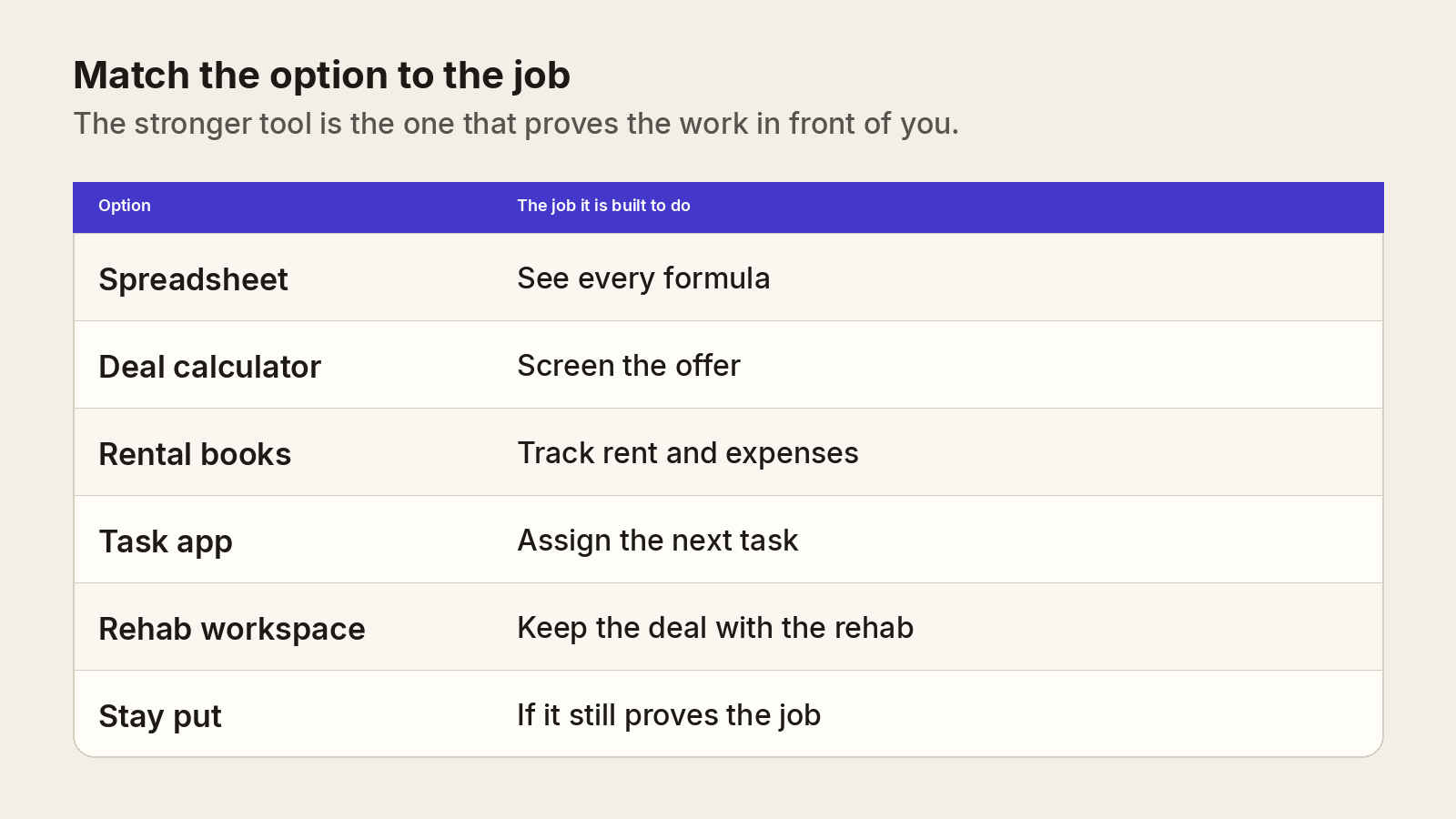
The grid is a sorting tool, not a ranking. None of these options is the grown-up choice for every investor. The fit depends on how many houses are live, whether anyone else has to update the file, and whether the exit is a sale or a hold.
A spreadsheet
A spreadsheet is the clearest place to see a formula. You can trace after-repair value, repairs, and a maximum offer without wondering which setting changed the total. One workbook can run one careful deal. It gets weaker when the photos, the permit, the text thread, and a second address all have to point at the same line. Our spreadsheet comparison and the spreadsheet alternative note stay on that boundary. Use them when the workbook is the contender. Do not treat a sheet as a moral failing if it still answers the question.
A general deal calculator, such as DealCheck
A deal calculator is built to screen a property. As of October 2026, DealCheck's pricing page says every plan includes a house flipping calculator, a rental cash flow calculator, sales and rental comps, and reports, and that you can use the product in a browser or in iOS and Android apps. That is a real strength when the job is "should I spend a Saturday on this house?" The same page leads with saved properties, photos, comps, and templates. It does not describe a contractor schedule or a draw package. Read the DealCheck comparison before you assume a low monthly price replaces the project file.
A rental bookkeeping tool, such as Stessa
A landlord ledger is built for income, expenses, rent, and tax packets on houses you operate. As of October 2026, Stessa's pricing page describes Essentials as a free plan with unlimited properties, automatic bank feeds, basic reports, and online rent collection. Manage adds a Schedule E report. Pro adds project expense tracking, budgeting, and unlimited receipt scanning. That is the right family of tools after a BRRRR refinance, when the job becomes rent and operating costs. It is the wrong family of tools if you still need a maximum offer and a rehab schedule. The Stessa comparison and the rental operating expense guide keep those jobs apart.
A general project-management app
A general task app is built to assign work. As of October 2026, Asana's features page describes tasks with owners and due dates, projects, and views that include a list, a calendar, a timeline, a Gantt chart, and a Kanban board. It also describes mobile and desktop apps, and guest access so external vendors and contractors can collaborate. Those are serious strengths for a crew that lives in a board. The page describes general work tracking. It does not present a house-flip calculator, a comparable-sales file, or a rehab cost database. A board can show that the tile is late. It does not, by itself, reprice the deal. This guide does not quote an Asana price, because the features page we reviewed is not a price list. Check Asana's own site before you treat any plan name as current.
A rehab workspace, including Rehabfolio
A rehab workspace earns its place when the offer, the scope, the budget, and the schedule have to stay on one property. Rehabfolio's deal analysis, rehab estimating, budget tracking, and project management pages describe that chain: the accepted numbers move into the project, and a schedule slip can be looked at next to the original profit. The product is browser-based. It does not currently ship a native mobile app. AI output is a draft you accept or reject, which is spelled out in the AI disclosure.
Staying on FlipperForce
Staying is an alternative to switching. FlipperForce's homepage describes the product as all-in-one house flipping software in market since 2018, with deal analysis, project tracking, and bookkeeping. The pricing page lists comps, a house flipping calculator, a rehab cost database and templates, a project scheduler, budget versus actual, and an AI receipt analyzer on the all-in-one comparison. The pricing FAQ says the FlipperForce Field app is for project updates and photos, while most features live in the web app. If that combination is the job you have, the honest recommendation is to stay and use it, not to migrate because a roundup told you to. The detailed product contrast lives on FlipperForce vs Rehabfolio.
3. Walk the decision in order
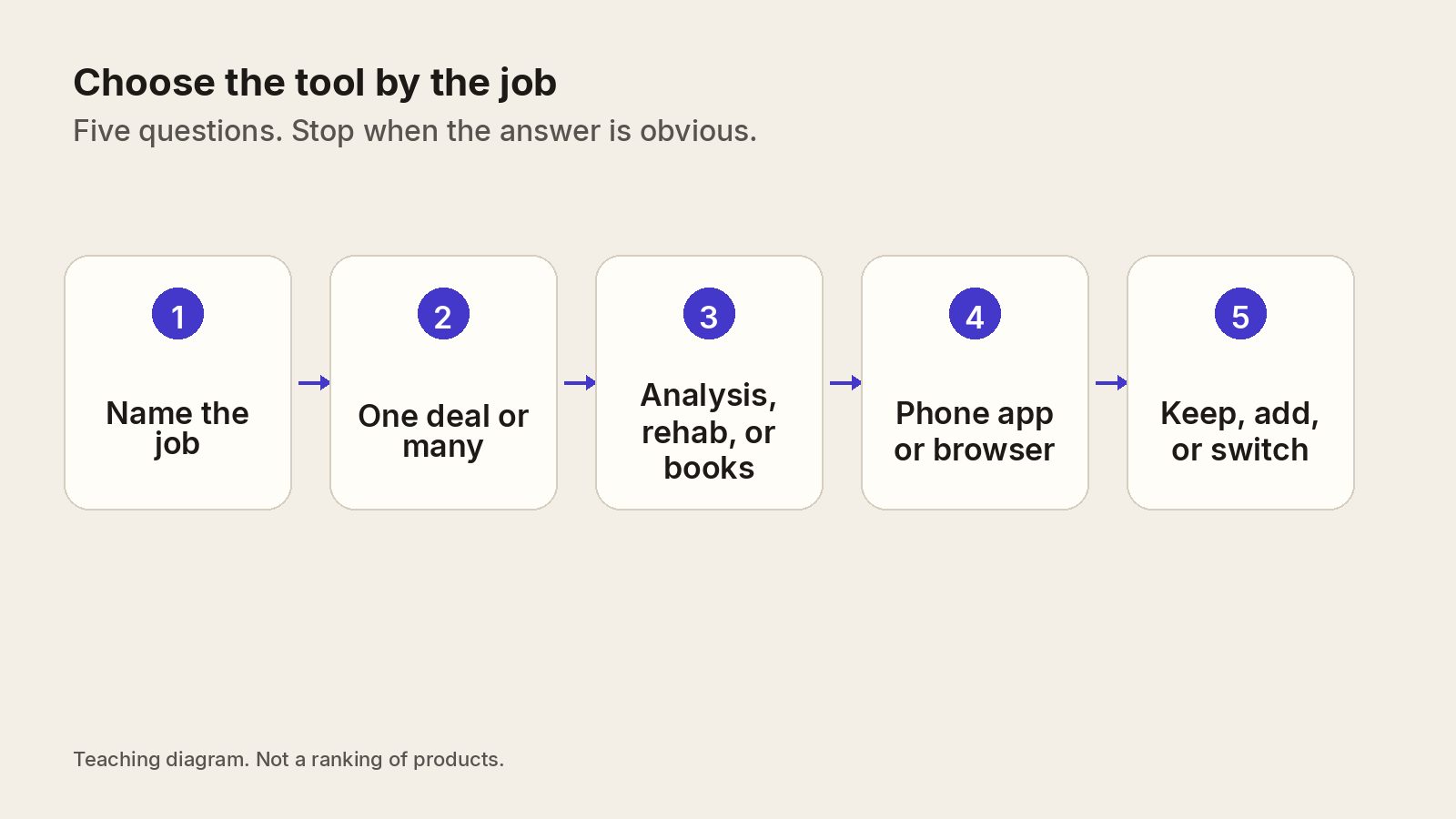
Take the five questions in order. Stop as soon as an option fails a question you actually care about. Do not collect six free trials and hope the tabs decide.
- Name the job. Screen, rehab, books, or rental operations. If you name two jobs, you may need two tools. That is allowed. Pretending one logo covers both is how a rent roll ends up inside a flip calculator.
- One deal or many. One house and one person can live in a spreadsheet or a starter calculator plan. Two active rehabs, or a second person who must update the file, pushes you toward a shared record with an owner on each task.
- Analysis, rehab, or books. Buy the depth you will open on a Wednesday. A calculator that cannot hold receipts is fine if Wednesday's job is still the offer. A ledger that cannot show after-repair value is fine if Wednesday's job is rent.
- Phone app or browser. If the only way your crew posts a photo is a native app, weight that higher than a price difference of a few dollars. If you already work in a phone browser, do not pay extra for an app you will not open.
- Keep, add, or switch. Keep when the current tool still proves the job. Add when a second job appeared, such as a rental after a refinance. Switch only when the live record is the thing that is failing, and you have a place to put the history.
A tool can also fail a test that has nothing to do with its brand. The International Association of Certified Home Inspectors' Standards of Practice say an inspection is not technically exhaustive, will not identify concealed or latent defects, and does not require the inspector to determine repair cost estimates. Software that drafts a rehab number from a listing, a photo, or a checkbox is thinner than that inspection. Whichever alternative you pick, the number is a screen until a walk, a bid, or a receipt replaces it.
4. Read published prices with the date attached
Prices are facts with a date, not a winner. As of October 9, 2026, check each vendor's site before you rely on a dollar. The figures in this section are the ones those pages showed on that review. Plans are not identical, so a lower price can also be a smaller job.
FlipperForce
On the FlipperForce pricing page, the all-in-one Solo plan is listed at $79 a month, or $708 billed yearly. The page describes it as one user and 50 leads and projects, with deal analysis, project management, and project accounting. The Team plan is listed at $199 a month, or $1,788 billed yearly, for up to five users and 100 leads and projects. The Business plan is listed at $499 a month, or $4,188 billed yearly. The pricing FAQ says Business user access is unlimited, and that active project caps are 50 on Solo, 100 on Team, and unlimited on Business, with archived projects not counting toward the cap. The same page lists analysis-only plans, including Solo Analysis at $49 a month, Team Analysis at $129 a month, and Business Analysis at $299 a month, for investors who want property data, comps, estimating, and reports without the full project stack. The FAQ also says annual plans include a 30-day money-back guarantee after purchase. Confirm the current offer on their site.
DealCheck
On the DealCheck pricing page, Starter is $0 with no credit card required, up to 15 saved properties, up to 5 photos, up to 5 sales and rental comps, and up to 5 templates. Plus is $10 a month, with higher caps on properties, photos, comps, and templates. Pro is $20 a month, with those four items listed as unlimited. The page says paid plans include a free 14-day trial. It also says the house flipping calculator and the rental cash flow calculator are included, and that the product runs in the browser and in iOS and Android apps.
Stessa
On the Stessa pricing page, Essentials is free and lists unlimited properties, automatic bank feeds, basic financial reports, and online rent collection. Manage is $12 a month paid annually, or $15 a month paid monthly, and the page says it adds a Schedule E report. Pro is $28 a month paid annually, or $35 a month paid monthly, and the comparison table lists project expense tracking, budgeting and pro-forma analysis, and unlimited receipt scanning on Pro. Stessa says plan terms, including pricing, are subject to change. The page is a landlord product. Do not read a rent-collection line as a flip underwriting promise.
Rehabfolio
On the Rehabfolio pricing page, Free is $0 for one user and 2 active projects. Solo is $69 a month for one user and 50 active projects. Team is $179 a month for 5 users and 100 active projects. Business is $349 a month with no user cap and no active-project cap in the plan catalog. Paid plans include a 14-day trial that requires a card and bills after the trial unless you cancel. The pricing page lists a 25 percent discount for annual billing. Those are our prices. They are not a claim that the included work matches another vendor line for line. The side-by-side discussion of what differs from FlipperForce is on the comparison page, not here.
A useful price check is three questions. What job does this dollar buy? What happens when I add a second property or a second person? What do I still have to do in another tool? DealCheck Pro at $20 a month can be the better buy for weekend screening. FlipperForce's $49 analysis plan can be the better buy if you want that vendor's comps and rehab templates without project accounting. A $0 spreadsheet can be the better buy for one house. A rehab workspace is the better buy when the cost of a split file is higher than the subscription.
5. Say where each option is stronger
Fair choosing means saying the quiet advantages out loud. A roundup that only lists gaps is an ad. Use this section as permission to stay, to add, or to switch.
- FlipperForce is stronger when you want a rehab platform that has published an all-in-one stack since 2018, a native Field app for updates and photos, a rehab cost database and material catalog, comps, a project scheduler, budget versus actual, and a receipt analyzer. The analysis-only plans are a real option if you do not want to pay for project accounting. Founder-handled support is what their pricing FAQ describes. Longevity and a field app are legitimate reasons to stay.
- A spreadsheet is stronger when you must see every formula, you have one property, and you already update the file. Nothing in a dashboard is more honest than a cell you can audit.
- DealCheck is stronger when the job is fast screening across flip and rental math, you want a free start with no card, and you want phone apps. The published prices are low relative to a full rehab platform. That is an advantage, not a trick, as long as you do not ask it to run the jobsite.
- Stessa is stronger when the house is, or will be, a rental. Bank feeds, rent collection, and a Schedule E package are landlord jobs. A flip tool that bolts on a rent field is not the same thing as books your tax preparer can follow.
- A general task app is stronger when the crew already lives there, you need guests for contractors, and you need list, calendar, and board views. It is the wrong place to hide the after-repair value.
- Rehabfolio is stronger when you want the offer, the estimate, the budget, and the project on one browser record, with public calculators before you create an account, and with AI kept as a draft. It is weaker if a native field app is required, if you want a published nationwide property-data subscription as the product's main promise, or if your only job is landlord banking and rent collection.
Two outside constraints should outrank the feature list. If a construction loan is funding the rehab, the Consumer Financial Protection Bureau's construction-loan explanation says the money is typically released in a series of advances as the work progresses. Your software has to be able to hold the evidence for those advances. The lender still decides. If you deduct expenses, the IRS page on what records to keep says you may use an electronic system, and that the system still has to show income, deductions, and the supporting receipts and invoices. A pretty board that loses the receipt is not a complete alternative.
6. Move the file without keeping two live copies
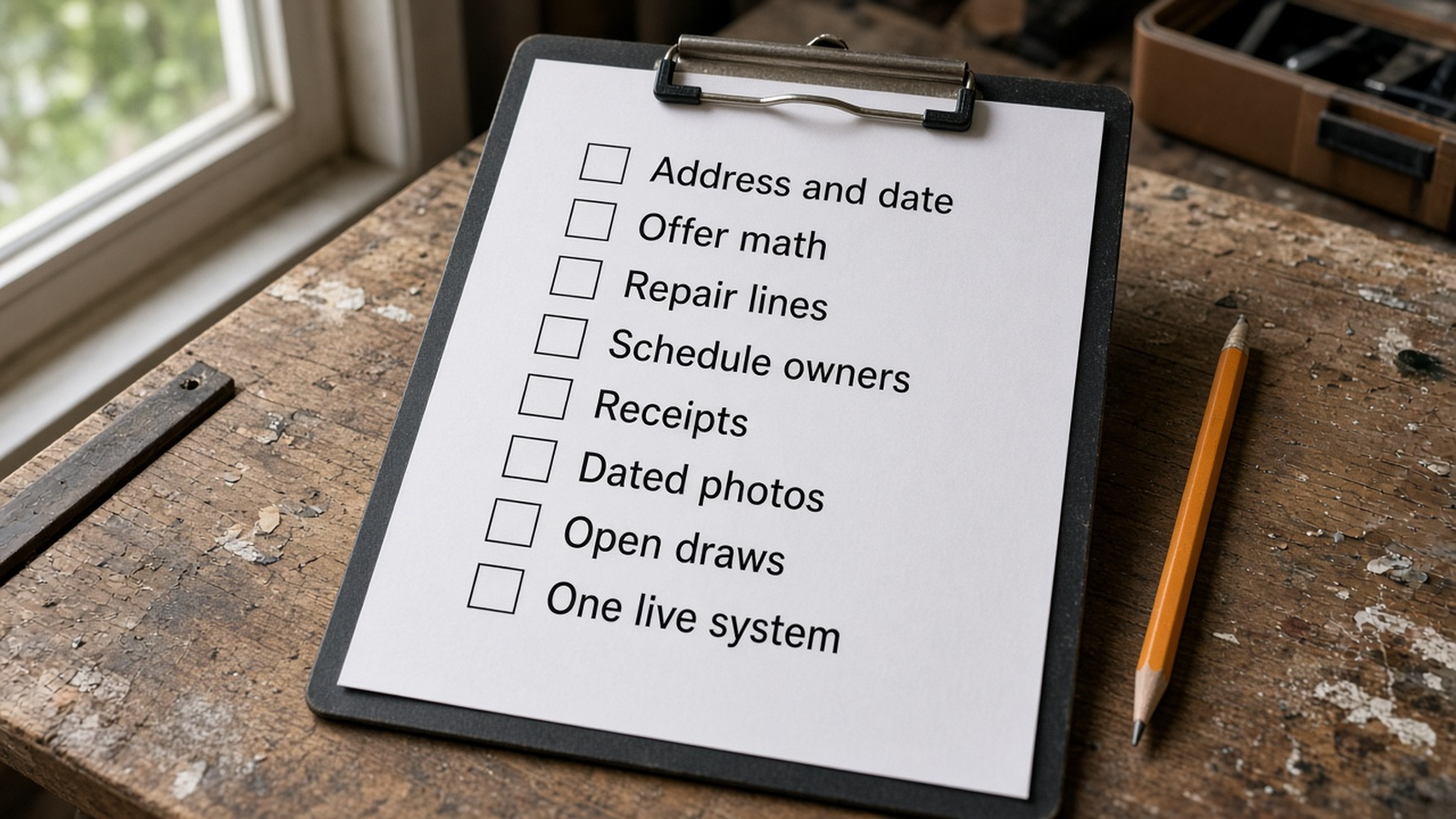
Most migrations fail in the overlap, not on export day. For two weeks the old system and the new system both accept receipts. The totals diverge. Nobody knows which one the draw package used. The cure is a freeze. Pick a date. Copy the history. Make one system the only place new facts are typed.
- Address and date. Write the property address and the date the numbers were true. A file without a date becomes "current" by accident.
- Offer math. Copy purchase price, after-repair value, the comps you actually used, financing, holding, and selling costs. Copy the walk-away price. Do not copy a single blended profit with the inputs thrown away.
- Repair lines. Copy scope lines, quantities, and which numbers are bids, allowances, or unknowns. A round repair total is not a scope. The scope of work guide is the standard for what "enough to bid" means.
- Schedule owners. Copy open tasks with a person and a date. A task with no owner is a wish in both systems.
- Receipts. Copy the image and the category, and keep the original file. The IRS expects supporting documents, not only a category total.
- Dated photos. Copy progress photos with the date and the room. A photo without a date cannot support a draw later.
- Open draws. If a lender is releasing advances, copy the last request, what was approved, and what is still held back. Do not restart the percent-complete story at zero.
- One live system. After the freeze date, new invoices and new tasks go in one place. The old login stays available as a read-only archive until you have answered one real question from the new file without opening the old one.
Export what the vendor actually lets you export. FlipperForce's pricing comparison lists CSV import and export on project accounting. That is their statement, not a promise about every screen. Download the reports you need while the subscription is active. Do not cancel first and hope the archive remains. If a column will not export, photograph or print the page to PDF and file it with the address and the date.
7. Work three named investor scenarios
These three investors are composites. Names, cities, and dollars are teaching examples, not case studies and not offers. Use them to see how the job changes the tool. Then replace every figure with your own.
Alicia, a first-time flipper with one house
Alicia is screening a 1958 ranch in Dayton, Ohio. She does not have a crew. She has a spreadsheet and a weekend. Her example inputs are a purchase price of $165,000, an after-repair value of $255,000, repairs of $38,000, buying costs at 2 percent of price ($3,300), selling costs at 8 percent of the after-repair value ($20,400), and holding costs of $1,400 a month for 5 months ($7,000).
The example stack is $165,000 + $38,000 + $3,300 + $20,400 + $7,000, which is $233,700. Subtracted from the example after-repair value, the illustrated profit is $255,000 - $233,700 = $21,300 before income tax and before anything the walkthrough has not seen. A quick 70 percent screen on the same example is 70 percent of $255,000, minus $38,000, which is $140,500. Her example purchase of $165,000 is above that screen. The gap is the lesson. A calculator that only shows one of those two numbers will feel decisive and still hide the other. The 70 percent rule guide and the ARV calculator are the screen. They are not the project.
Alicia does not need team permissions, a field app, or rent collection. A spreadsheet she updates, or a DealCheck-style calculator on the published free or low monthly plan, matches the job. FlipperForce analysis-only, at the $49 Solo Analysis price published in October 2026, also matches if she wants that vendor's comps and rehab templates. A full project platform is optional until a contractor schedule and receipts exist. Switching now would add a login and not add a fact.
Marcus, a two-crew operator
Marcus runs two active rehabs in the Atlanta area. A project manager and a lead carpenter both touch the file. Example House A has a repair budget of $86,000 and example spend of $41,000, so $45,000 remains. Example House B has a repair budget of $104,000 and example spend of $22,000. House A slips 21 days. His example holding cost on that house is $2,100 a month, so the slip is 21 / 30 times $2,100, or $1,470, before any extra dumpster cost or a rescheduled inspector.
A general task app can show the slipped date, the owner, and the board the crew already opens. Asana's features page is honest about that kind of tracking, including guest access for contractors. The $1,470 does not appear unless someone writes the holding rate next to the date. FlipperForce is a strong fit here if the crew will post updates in the Field app and he wants budget versus actual in the same vendor, which is what their pricing page says the all-in-one plans include. Rehabfolio is a strong fit if he wants that slip read against the original deal in one browser record and the crew will actually use a phone browser. The project management page describes tasks, photos, and the original underwriting on one record. It does not describe a native app. If the carpenter will not post without the app he already has, Marcus should stay. The subscription he resents is cheaper than a silent jobsite.
His migration rule, if he does move, is one house at a time. Finish the copy for House A, freeze new costs there, and leave House B in the old system until House A answers "what is left in the budget?" without opening the old login. Two half-migrations across two crews is how the $1,470 gets lost.
Priya, a BRRRR investor
Priya is buying a small house in Indianapolis to renovate, rent, and refinance. Example purchase price $198,000. Example rehab $62,000. Example after-repair value $280,000. Example monthly rent $2,050. Example operating expenses $820 a month, so an example net of $1,230 a month before debt, or $14,760 a year. Those operating expenses are a teaching stack, not a local quote. The BRRRR guide is where the refinance and cash-left-in-deal method lives. This page only asks which software holds which chapter.
During construction her job matches Marcus more than it matches a landlord app. She needs repair lines, photos, and a budget. After the refinance, her job matches Stessa's published plans: rent collection, bank feeds, and a Schedule E package on the paid Manage plan they list. Asking the rehab tool to become the rent ledger, or asking the rent ledger to price the maximum offer, makes both files worse. A clean split is allowed. Many durable setups are a calculator or rehab record through the project, then a landlord ledger once the tenant is in place. The BRRRR use case and the fix-and-flip use case describe the operating path. They are not substitutes for Stessa's own rent and banking pages, which you should read if rent collection is the job.
Priya's example refinance sketch, 75 percent of the $280,000 example value, is $210,000 of new debt. That figure is only a screen. A lender, an appraisal, and reserves will change it. No alternative in this guide removes that. The software job is to keep the rehab actuals, so the cash she thinks she left in the deal is not a memory.
8. Write the decision down
Close the tabs and write four lines. You are done choosing when another person could follow them.
- The job this month. One sentence. Screening, running a rehab, keeping receipts, or operating a rental.
- The system of record. The single place new facts will be typed after a date you name.
- The tool you are not asking to stretch. Name it. The calculator will not store draws. The rent ledger will not set after-repair value. The task app will not price a delay unless you add the holding rate yourself.
- The review date. Thirty days out, ask whether the crew posted, whether you can find the receipt, and whether the offer you believed is still visible. If the answer is no, the alternative failed the job, even if the marketing page was accurate.
Run that review on a real property, not on a sample dashboard. The rehab cost calculator can hold a screen with no account. It still is not a bid. If the 30-day note says "we stopped opening it," that is data. Switch or simplify. Do not add a third login to compensate.
9. Where Rehabfolio fits, and where it does not
Rehabfolio is a fit when the property you are buying has to remain the property you are renovating. Paste a listing into a draft, keep the comps you accept, turn the walkthrough into scope lines, and let tasks and receipts sit on that same record. The public flip analysis calculator runs without an account. A free workspace is published at $0. You move to a paid plan when the project cap, the seats, or the monthly AI allowance on your current plan is the limit you actually hit. Nothing in that workflow is allowed to skip your acceptance. If an AI draft disagrees with a bid, the bid wins.
Rehabfolio is not the best fit in three honest cases. You need a native phone app because that is how updates get posted, and FlipperForce Field is already that habit. You only screen deals and a $0 to $20 calculator, or FlipperForce's published analysis-only plan, covers the job at a lower price. You are operating rentals and you need bank feeds, rent collection, and a tax package, which is the job Stessa's pricing page describes. In those cases the alternative is the other product, or the spreadsheet, and this guide should help you stay there without guilt.
If you do want the combined record, start with one live address, not a full import. Confirm the offer math, then the scope, then one week of tasks. The project software guide tells you how to run the week after the choice. The comparison index points at each head-to-head page, including FlipperForce, without asking this article to repeat them.
Frequently asked questions
What counts as a FlipperForce alternative?
A FlipperForce alternative is any system that can do the job you are actually hiring the software to do. That job might be a one-deal offer screen, a rehab schedule with photos, rental books after a refinance, or one record that keeps the offer and the project together. A spreadsheet, a general deal calculator, a landlord ledger, a task app, and a rehab workspace can each be the right alternative for a different job. Staying on FlipperForce is also a valid result when its published tools still match the work.
Is a cheaper deal calculator a full replacement?
Not by itself. As of October 2026, DealCheck's pricing page lists a house flipping calculator, rental cash flow, comps, and reports, including a free Starter plan. That is a strong screen for an offer. That same page does not present a construction schedule, a draw packet, or a receipt file. Use the calculator to decide whether the deal deserves a walkthrough. Move the accepted numbers into the project system you will still open on week three.
When is a spreadsheet the better FlipperForce alternative?
A spreadsheet is the better choice when you have one property, you can open the file and see every formula, and you update it on a set day. It gets weak when photos, permits, texts, and a second job all have to point at the same line. A careful workbook is not a failure. It is the right tool until the file stops being the source of truth.
Can rental bookkeeping software replace rehab project software?
Use rental bookkeeping for the landlord job. As of October 2026, Stessa's pricing page describes a free Essentials plan with unlimited properties, bank feeds, and online rent collection, and it lists project expense tracking on the Pro plan. That is a fit after you hold the house and collect rent. It is not a substitute for underwriting the purchase or running the rehab schedule. Many BRRRR investors keep a rehab record during construction and a landlord ledger after the refinance.
Should I switch if I like the FlipperForce phone app?
Maybe not. FlipperForce's pricing FAQ says most features live in the browser and that the FlipperForce Field app posts project updates and photos from a phone. Rehabfolio does not ship a native mobile app. The workspace is a responsive browser, and you can review tasks and upload photos from a phone browser. If a native field app is the reason your crew posts updates, that is a real reason to stay. If you mostly need the offer and the budget in one record, compare the workflow and try both before you cancel anything.
How should I move a deal without losing the history?
Copy the address, the date of the numbers, the offer math, the repair lines, the schedule owners, the receipts, the dated photos, and any open draw. Keep the old file read-only until the new file can answer the same questions. Do not keep typing new costs into both systems. The IRS says your records, including electronic ones, must show income and expenses and that you should keep the supporting receipts and invoices. A second live copy is how totals drift.
Does AI inside a rehab tool decide the offer?
No. A model can draft a scope, sort notes, or suggest categories for a receipt. A person still checks the comps, the repair lines, and the walk-away price. Treat every AI result as a draft until you accept it. The brand of the model does not make a number true. If a tool will not show the source behind a value or a repair total, do not let that sentence become the offer.
Editorial methodology, limitations, and sources
The Rehabfolio editorial team wrote this page because investors were searching for FlipperForce alternatives, and the library did not yet have a beginner choosing guide for that intent. The commercial page at /vs/flipperforce remains the head-to-head between those two products. The comparison index remains the directory. The project management guide remains the weekly operating guide. This article is only the job-to-be-done sort among a spreadsheet, a deal calculator, a rental ledger, a general task app, a rehab workspace, and staying put.
Competitor facts are limited to what each vendor published on its own site on October 9, 2026. FlipperForce plan prices, user and project caps, analysis-only plans, the Field app description, and listed features such as the rehab cost database, scheduler, and receipt analyzer come from the FlipperForce pricing page. The 2018 market date and the all-in-one description come from the FlipperForce homepage. DealCheck plan prices, limits, calculators, trial, and iOS and Android apps come from the DealCheck pricing page. Stessa plan prices and the landlord feature list come from the Stessa pricing page. Asana task, view, mobile, and guest descriptions come from the Asana features page. We did not use review sites, affiliate tables, or scraped testimonials for those facts. We did not repeat vendor user counts. If a page changes, the dollar in this guide can be wrong the next day. Check the vendor's site.
Independent sources are the InterNACHI Standards of Practice, including the statements that an inspection is not technically exhaustive, will not identify concealed or latent defects, and does not require repair cost estimates. The Consumer Financial Protection Bureau's construction loan answer describes short-term funding released in advances as work progresses. The IRS page on records to keep says electronic books must still show income and expenses, supported by receipts, invoices, and proof of payment. Those pages limit what any alternative can honestly automate. They do not set your price.
Public vendor pages cannot tell you whether your crew will open an app, what a Dayton roof costs, or whether a lender will accept your draw packet. Examples are original composites. They are not testimonials or performance claims. Rehabfolio plan figures come from our own pricing catalog and pricing page.
Editorial standard. We identify the audience, author, review date, topic boundary, assumptions, calculations, product limits, and sources. We do not invent credentials, licenses, testimonials, market statistics, or guaranteed savings. AI may help organize research and draft, and a person reviews the claims, calculations, links, examples, and limitations before publication. We revise the guide when a cited page, a product workflow, or a material practice changes. See the editorial methodology.
Keep the offer, the scope, and the project on one property.
Start a free workspace when you want that chain in one file. If a spreadsheet, a calculator, a rent ledger, or FlipperForce already proves the job, keep it.
Create free account